Some nights you can’t be there. You’re on a late shift, on a work trip, deployed overseas, or you’re a grandparent who lives a flight away. The story still gets read — but not by you.
KidsGotWings lets a grown-up in the family record a short sample of their voice, and then narrates stories in a voice modeled on it. This post explains how that works, what we ask of you before we do it, and how to get a recording that sounds right. It’s entirely optional: every story can be narrated by a stock storyteller instead.
Why a familiar voice matters
Reading aloud is widely encouraged by educators and pediatric organizations, and part of what makes it valuable is the shared attention between a child and the person reading. A recording can’t replace that. What it can do is keep a familiar voice in the bedtime routine on the nights when the person can’t be in the room — and for many children a parent’s or grandparent’s voice is a comforting part of the end of the day.
We think of it as a bridge, not a substitute. When you’re home, read the story yourself.
Who uses it
- Parents who travel or work nights — tonight’s story in your voice, even when you’re in another time zone.
- Deployed and long-distance parents — a way to be part of the routine between calls.
- Grandparents and relatives far away — the child hears Grandpa read the story that stars them.
- Families who share bedtime — whoever is doing bedtime can play the story in the other parent’s voice.
How it works, step by step
- Add the person in My Family. A voice belongs to a family member, so the person needs a card there first.
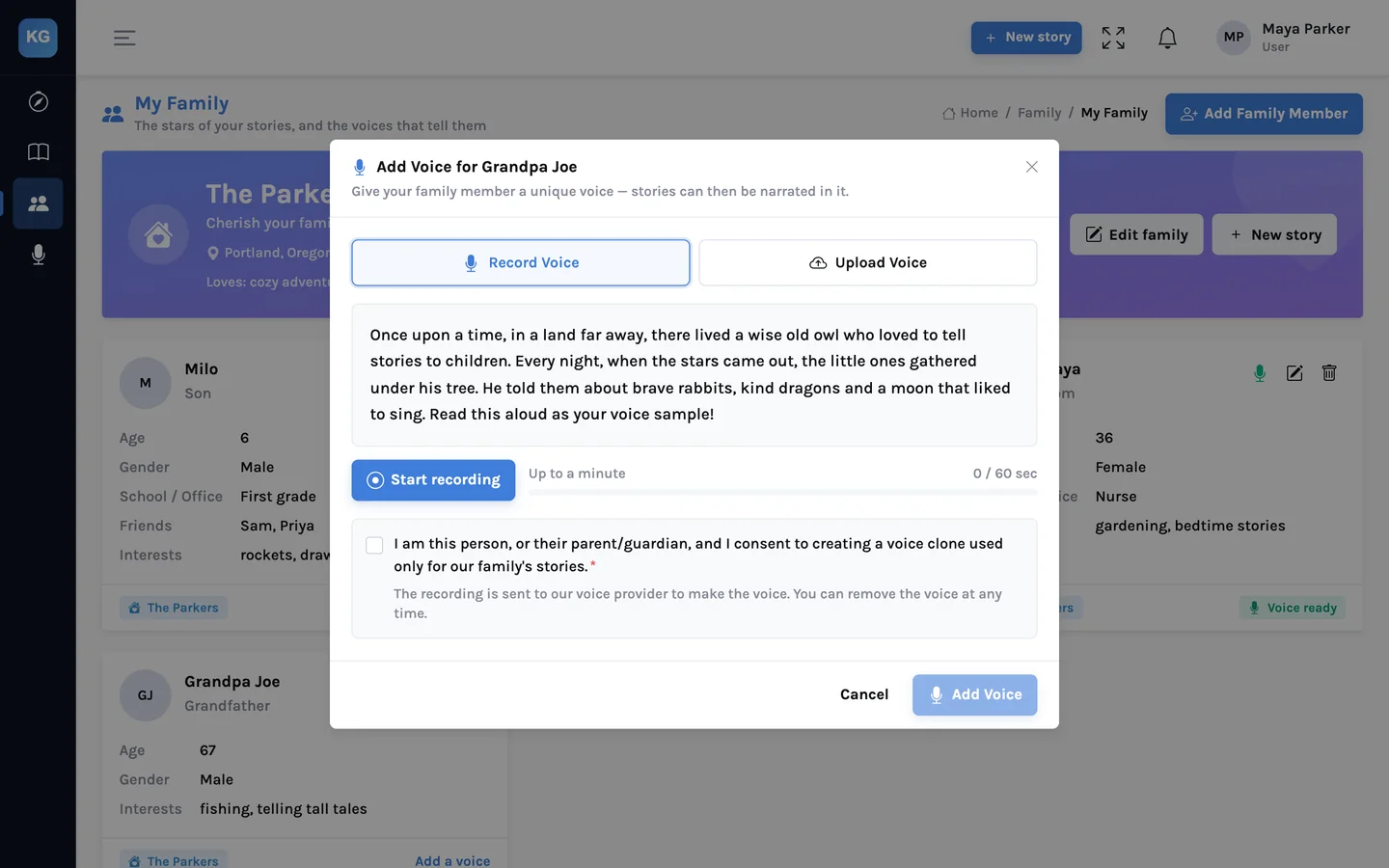
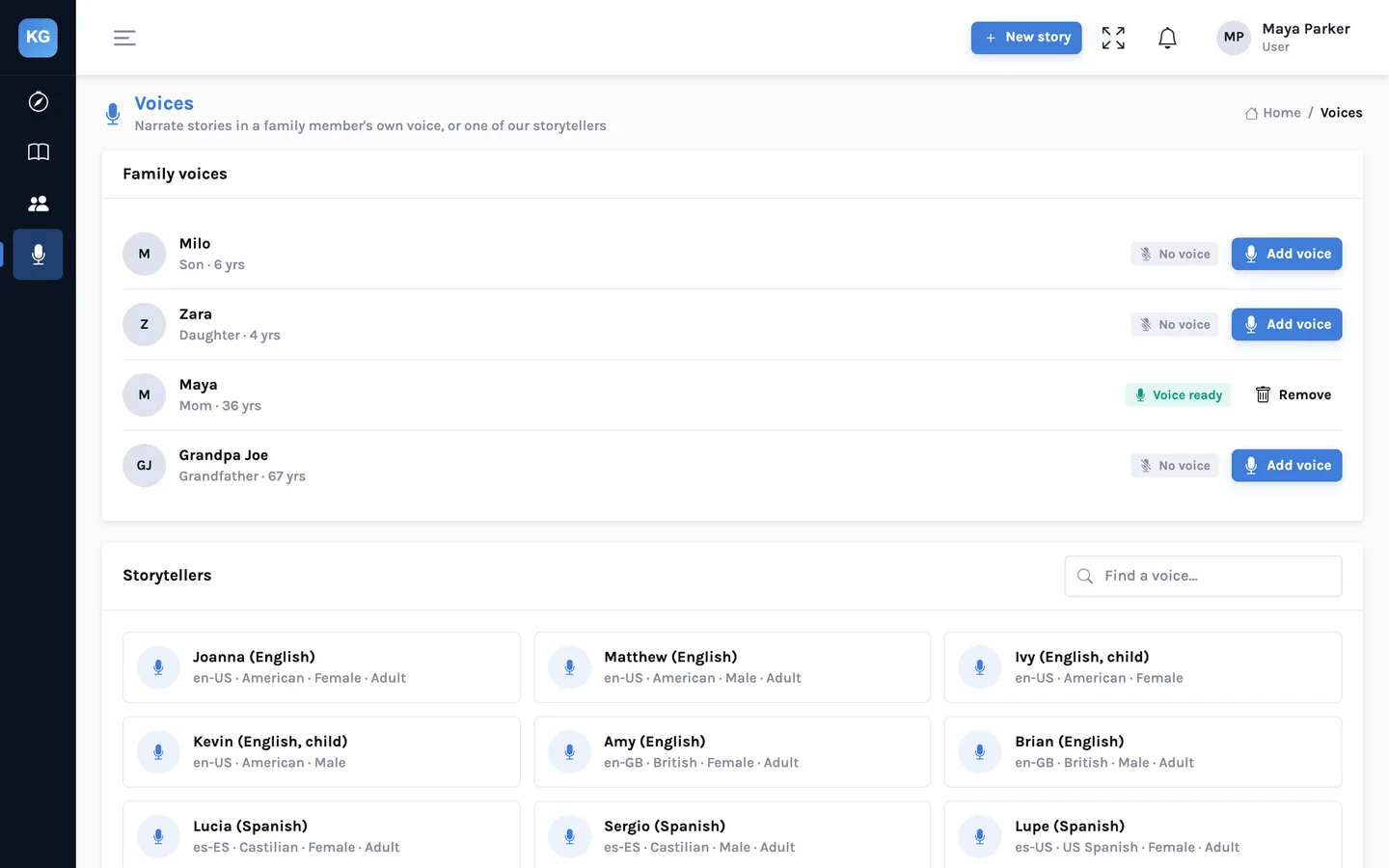
- Choose “Add a voice” on their card in My Family (or Add voice on the Voices page). You’ll see two choices: record now, or upload a recording you already have.
- Record. A short passage appears on screen to read aloud. Recording stops by itself after one minute. You can listen back and try again as many times as you like before going further.
- Give consent. Before a voice is created you’re asked to confirm that the voice is your own, or that the person it belongs to has agreed. Nothing is created until you do.
- Create the voice. The recording is sent to our voice provider, ElevenLabs, which builds the voice. The family member’s card then shows that their voice is ready.
- Use it. When you narrate a story’s sections, choose the family voice instead of a stock storyteller. You can mix them — a stock voice for one story, Mom’s for the next.
Getting a good recording
The voice can only be as good as the sample. A few minutes of care here pays off in every story afterwards.
- Find a quiet room. Soft furnishings help; kitchens and bathrooms echo. Turn off the TV, the dishwasher and the fan.
- Hold the device still, about a hand’s length from your mouth. Don’t cover the microphone.
- Read the way you read to your child. Warm, unhurried, with a little expression. The voice will carry that tone into every story.
- Use most of the minute. A longer, steady sample gives better results than a few rushed seconds.
- Listen back before you continue. If you can hear a hum, a cough or a door, record it again.
Consent, in plain words
A person’s voice is personal. We treat it that way, and we ask you to as well.
What we ask of you
- Only record a voice with that person’s agreement. Your own voice is yours to give. For anyone else — a partner, a grandparent — ask them first, and let them do the recording themselves if they can.
- Record grown-ups. The feature is designed for the adults who read to a child, not for children’s voices.
- Never upload a recording of someone who hasn’t agreed, including public figures and performers. That isn’t what this is for, and it isn’t allowed.
What we do
- It’s opt-in. No voice is created unless someone records or uploads a sample and confirms consent.
- It stays with your family. A voice made in your account is only offered in your account. Other families can’t pick it.
- You can remove it. Removing a voice from a family member’s card deletes the voice at our voice provider and clears it from the card. Deleting all of your data from the account page removes your cloned voices too.
- We name the provider. Family voices are created and produced by ElevenLabs; the sample you record is sent to them to create the voice. Stock storyteller voices come from our hosting provider, Amazon Web Services.
What to expect from the result
A cloned voice is a likeness, not a recording of you reading. It will usually be recognizably you, and it will read whatever the story says, but it may pronounce an unusual name differently from how you would, or put the stress in an unexpected place. A few practical notes:
- Listen to each section after narrating it. If a line sounds wrong, edit the text — spelling a name the way it sounds often fixes it — and narrate that section again.
- Other languages vary. Narration follows the story’s language. How a voice sounds in a language the speaker didn’t record in can differ; try a short story first.
- Sound effects work with any voice, so a story keeps its atmosphere whichever narrator you choose.
- Creating voices and narrating stories count toward your daily free limits. Your account page shows what you’ve used today.
Before you share a story with your voice
Stories are private unless you switch on Share in Discover. If you share a story narrated in a family voice, anyone who opens it will hear that voice. That’s fine if the person is happy with it — but it’s their call. If in doubt, narrate the public version with a stock storyteller and keep the family-voice version private.
If voice cloning isn’t for you
That’s completely fine. You have other good options:
- Stock storytellers. Preview them on the Voices page and pick the one your child likes.
- Read it yourself. Open the story in the reader, leave the narration off, and read the pages aloud. On a video call, you can read while the child follows along at home.
- Print it. A story printed as a picture book can be read by whoever is doing bedtime tonight.
Quick answers
- Is it required? No. It’s off until someone chooses to add a voice.
- How long is the sample? Up to one minute of reading aloud.
- Who can use my voice? Only people signed in to your family’s account.
- Can I delete it? Yes — remove it from the family member’s card, or delete all your data from the account page.
- Does it cost extra? KidsGotWings is free to start, with daily limits that include voice creation and narration.
For the bigger picture, read How we keep stories safe for kids or the child safety page.
Make tonight’s story
Describe it in a sentence, or pick your family as the characters. It’s free to start, and private unless you choose to share.
Create your first story